


Description
Download anonymoX – Fast Anonymous Browsing for Firefox
Overview
In an era where every click can be tracked, anonymoX offers a simple yet powerful way to protect your online identity while using the Firefox browser. This free add‑on creates a random “identity” at the click of a button, swaps your visible IP address, and can instantly delete cookies whenever you change sites or identities. Unlike many VPNs and proxy services that require complex configuration or dramatically slow down page loads, anonymoX installs like any other Firefox extension and automatically activates a random IP from a curated list of US, European, and Asian locations.
The extension’s interface lives next to the address bar, giving you immediate visual feedback on which IP you are using and allowing you to switch identities in seconds. You can also toggle between anonymoX’s own proxy network and the Tor network for an extra layer of anonymity. When you leave a website, a friendly prompt asks if you want to clear the cookies that site set, helping to prevent cross‑site tracking. While the feature set is intentionally lightweight, it covers the essential privacy needs of casual users who want a quick, free solution without the headache of heavyweight VPN clients.
If you need occasional IP masking for tasks like testing geo‑restricted content, avoiding simple tracking scripts, or just browsing without a persistent fingerprint, anonymoX provides a secure, fast, and easy‑to‑use tool directly inside Firefox. For power users who demand granular control, the free tier may feel limited, but the premium version adds more locations and higher speeds. Overall, anonymoX is a solid entry point for anyone looking to add a privacy layer to their everyday browsing.
Key Features of anonymoX
- One‑click random IP generation from US, EU, and Asian locations.
- Built‑in toggle between anonymoX proxy network and Tor for deeper anonymity.
- Automatic cookie deletion prompt when changing sites or identities.
- Live status bar showing current IP address and selected region.
- Fast connection speeds for most regions, with US locations occasionally slower.
- Simple UI integrated directly into the Firefox toolbar.
- Free tier available with optional premium upgrade for more locations and priority bandwidth.
- Secure HTTPS connections to protect data in transit.
- No need for external applications or separate VPN clients.
- Regular updates from the developer to keep up with Firefox releases.
Installation, Configuration, and Everyday Use
Getting started with anonymoX is as straightforward as installing any other Firefox add‑on. First, open Firefox and navigate to the official anonymoX page on Mozilla’s Add‑Ons site. Click the “Add to Firefox” button, confirm the permissions, and the extension will appear next to the address bar. No restart is required.
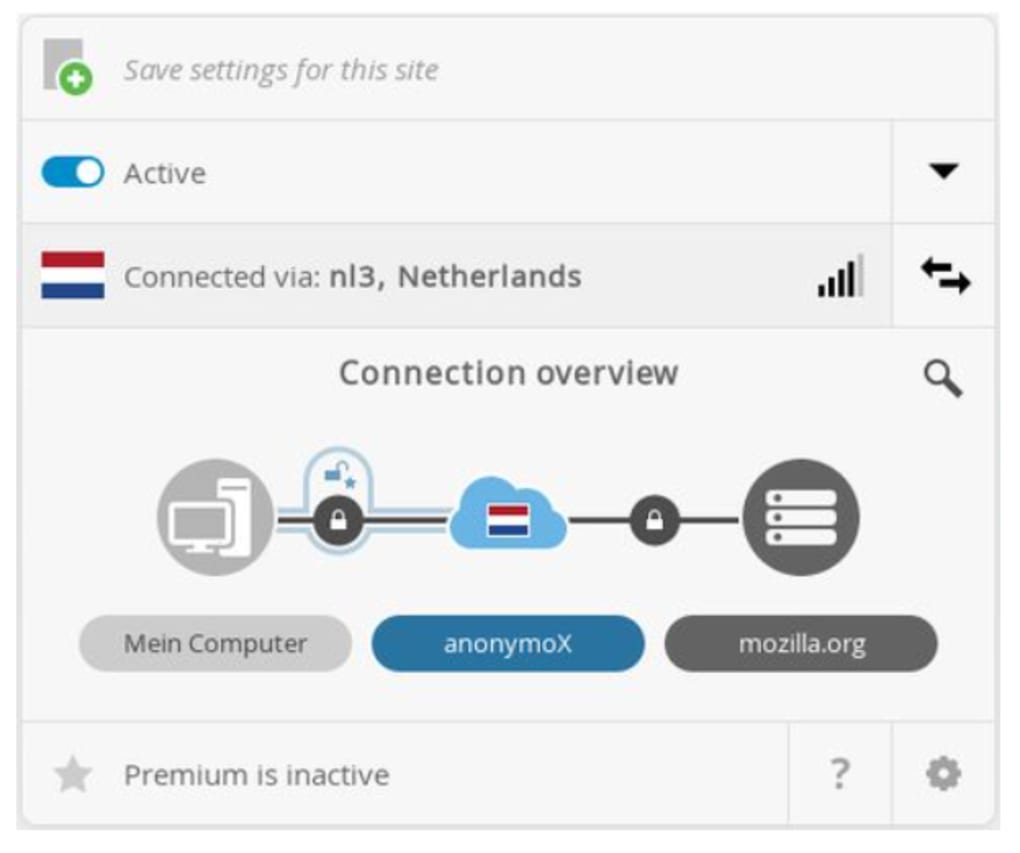
Upon first launch, anonymoX automatically selects a random identity and displays the active IP in a small badge. To choose a specific region, click the anonymoX icon and pick from the dropdown list of countries. Each selection instantly re‑routes your traffic through the chosen proxy, and the badge updates with the new public IP, which you can verify on sites like whatismyip.com.
The extension also offers a quick “Switch to Tor” button for users who need the additional anonymity that Tor provides. When you enable Tor mode, the badge changes color to remind you that traffic is now passing through the Tor network, which may be slower but offers stronger protection against network‑level surveillance.
Cookie management is handled automatically: after you navigate away from a site or change your identity, a non‑intrusive popup asks if you’d like to delete the cookies set by the previous site. Accepting this clears the stored cookies, reducing the chance of cross‑site tracking. For users who prefer a fully hands‑off approach, you can enable “Auto‑clear cookies” in the add‑on’s options page, located under Preferences → Extensions → anonymoX → Options.
Updating the extension is seamless; Firefox notifies you when a new version is available, and a single click installs the update without losing your settings. The developer also provides a changelog that highlights performance improvements and added proxy locations.
Compatibility, Pros & Cons, Frequently Asked Questions, and Final Thoughts
Compatibility: anonymoX is designed exclusively for the Firefox browser on Windows, macOS, Linux, and the Firefox for Android platform. It does not work with other browsers such as Chrome, Edge, or Safari. The add‑on requires Firefox version 78.0 or newer, which covers the vast majority of active users.
Pros
- Instant, one‑click IP switching without leaving the browser.
- Free tier provides enough locations for casual privacy needs.
- Built‑in cookie clearing reduces tracking footprints.
- Lightweight UI that does not clutter the toolbar.
- Option to route traffic through Tor for higher anonymity.
- Regular updates keep the extension compatible with new Firefox releases.
Cons
- Limited configuration options; power users may find it too simple.
- US proxy nodes can be slower compared to European or Asian nodes.
- Only works with Firefox; no support for Chrome or other browsers.
- Free version caps the number of simultaneous connections.
- No built‑in DNS leak protection beyond the proxy itself.
Frequently Asked Questions
Is anonymoX completely free to use?
Yes, the core features—random IP selection, cookie clearing, and Tor toggle—are available at no cost. A premium upgrade offers more proxy locations and faster bandwidth.
Can I use anonymoX on mobile devices?
Absolutely. anonymoX is compatible with Firefox for Android, providing the same one‑click IP swapping experience on smartphones and tablets.
Does anonymoX protect against DNS leaks?
The extension routes HTTP/HTTPS traffic through its proxy servers, which mitigates most DNS leaks. However, it does not replace a full‑featured VPN that encrypts all network traffic at the system level.
How do I know which IP address is currently active?
The anonymoX badge in the toolbar displays the public IP and the selected country. Clicking the badge opens a small overlay where you can view detailed information and change the identity.
Is my data logged by anonymoX?
According to the developer’s privacy policy, anonymoX does not retain logs that could identify individual users. Only minimal connection statistics are stored for service maintenance.
anonymoX delivers a surprisingly robust privacy tool for Firefox users seeking a quick, free solution. Its strengths lie in the intuitive UI, rapid IP switching, and automatic cookie management, which together make casual anonymization effortless. While power users may crave deeper network controls, the extension’s simplicity is exactly what most everyday browsers need. The occasional speed dip on US nodes is the only notable drawback, but for the majority of scenarios the performance remains acceptable. Overall, anonymoX earns a solid 4‑out of 5 stars.
Conclusion & Call to Action
If you’re looking for a lightweight, free way to mask your IP and reduce tracking while browsing with Firefox, anonymoX is a compelling choice. Its one‑click interface, built‑in cookie clearing, and optional Tor routing give you a respectable privacy shield without the complexity of full‑scale VPN services. Download the add‑on today, experiment with the different regional identities, and enjoy a safer online experience. For users who need more locations or higher bandwidth, the premium upgrade is just a click away, but the free tier already covers most casual use cases. Secure your browsing habit now—install anonymoX and surf the web with confidence.
Guides & Tutorials for anonymoX
How to install anonymoX
- Click the Preview / Download button above.
- Once redirected, accept the terms and click Install.
- Wait for the anonymoX download to finish on your device.
How to use anonymoX
This software is primarily used for its core features described above. Open the app after installation to explore its capabilities.
User Reviews for anonymoX 0
No reviews found




.webp)